 Save to Sell
One Sales Tracker for your whole sales team
Your reps get a tracker that writes their follow ups and keeps itself current. You get one bill, and on Corporate, a team dashboard that has the numbers ready for the weekly meeting.
Every Pro feature free for 30 days for each rep. No credit card.
What your reps get
Everything in Pro for each rep, on every team plan.
Leads in seconds
Business cards, LinkedIn screenshots, Excel lists and PDFs become leads with a follow up plan. No typing.
Follow ups in their own voice
Cold emails, follow ups, LinkedIn notes, letters and call scripts, written the way each rep writes.
A plan for every lead
Seven follow up steps with due dates, and a list of who's due today. See the follow up plan.
Their week, ready for you
My Sales Activity Report turns a rep's week into a report they send you in one click.
The manager tools on Corporate and Enterprise
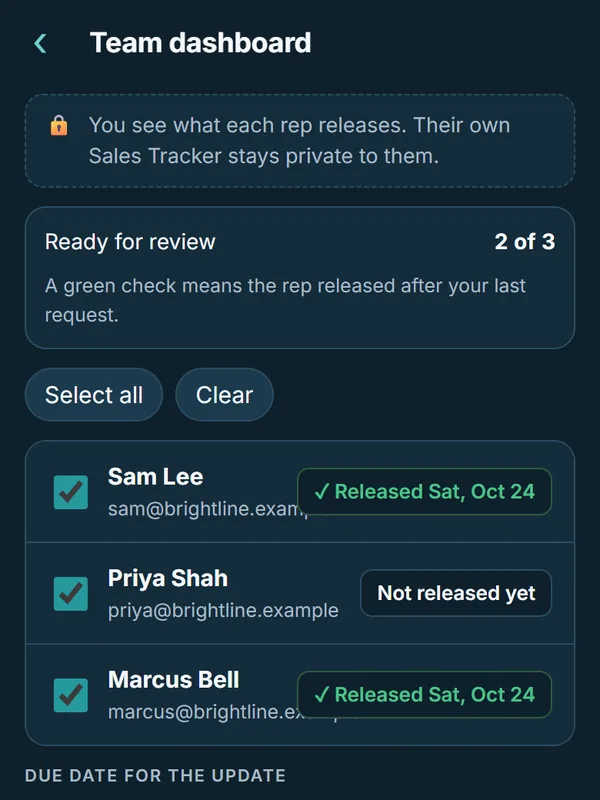
- Team dashboard. Reps release their Sales Tracker for your review. A green check shows who released after your last request.
- Update requests. Pick the reps and a due date, and each one sees the request in the app.
- A printable meeting summary. The released trackers in one summary for the sales meeting.
- Shared limits. Screenshots and leads are pooled across the company, 300 screenshots and 1,000 leads a rep.
- Leads stay with the company. When a rep leaves, you hand the leads they added on the team to another rep.
On the Team plan, reps share one bill and one monthly AI budget, and each rep keeps their own leads. The manager tools above come with Corporate and Enterprise.
What a manager sees, and what stays private
You see what each rep releases to you. A rep's screenshots, drafts and About Me stay private to them, and a rep joins your company account only when they tap Join the team.
Who keeps the leads on each plan
The same rules are in the Terms of Service.
| Plan | Leads a rep adds | What a manager sees |
|---|---|---|
| Free and Pro | Always the rep's | Nothing. It's a rep's own account. |
| Team | The rep's, even after they leave the team | Nothing. Team is one bill, with no manager tools. |
| Corporate | The company keeps leads added on the team. Leads from before the rep joined stay theirs. | What each rep releases for review |
| Enterprise | The same as Corporate | What each rep releases for review |
Team plans and prices
| Plan | Team size | Price (US) |
|---|---|---|
| Team | 3 to 9 reps | $19.99 a rep a month, 3 to 9 reps ($59.97 a month for 3), or $199 a rep a year, 2 months free |
| Corporate | 10 to 49 reps and their manager | $24.99 a rep a month, 10 reps minimum ($249.90 a month), or $249 a rep a year, 2 months free. Direct support, answered within 1 business day. |
| Enterprise | 50 reps or more | Custom yearly pricing, with limits set for your team, onboarding for managers and reps, priority support and invoicing |
Selling on your own? Pro is $19.99 a month or $199 a year. See every plan.
How to try it with your team
- Start with your own leads. Open Save to Sell and add a few business cards or a list. Every Pro feature is free for 30 days.
- Set up Team or Corporate in the app. Pick the plan for your team size and add your company name.
- Add your reps by email. When a rep signs in to Save to Sell with that email, they tap Join the team.
- Run one weekly meeting from it. On Corporate, request updates before the meeting and print the summary.
50 reps or more?
Email support@savetosell.app with your team size, and we'll send a quote sized to your organization.

Questions managers ask
Can a manager see a rep's whole Sales Tracker?
No. On Corporate and Enterprise, a manager sees what each rep releases for review. A rep's screenshots, drafts and About Me stay private to them.
Who keeps the leads when a rep leaves?
On Team, the rep keeps every lead. On Corporate and Enterprise, the company keeps the leads a rep added while on the team, and the manager hands them to another rep. Leads from before the rep joined stay theirs.
Can someone be added to a team without knowing?
No. A rep joins a company account only when they tap Join the team.
Can my company pay for one rep's Pro plan?
Yes. Reps can expense their sales tracker with a ready note for their manager.