 Save to Sell
Finally. A Sales Tool that Sells Like You.
Your AI sales assistant. It handles the admin and cleanup, so you can go sell.
Replace your Current Tracker. Change your Sales Activity Overnight.
- Every Pro feature free for 30 days. No credit card.
- We never sell your leads or use them to train AI.

Go Sell, Let S2S Manage
- Logging calls
- Cleaning up lead lists
- Chasing notes
- Building reports for everyone else
Hours every week that belong with your clients. Spend more time on sales activity, not the administration part of sales.
Save to Sell (S2S) replaces your existing, outdated Sales Tracker with one that works for you, saving you time so you can focus on your sales activity.
Lead management done in seconds, not hours.
Let your sales tracker work for YOU.
Two steps
Build your leads
Lead generation, done in seconds
- 01Snap a business card, upload a screenshot or a list, or just tell S2S by voice.
- 02It reads everything, builds each lead and updates the ones you have.
- 03Reports, proposals and Sales Summaries are ready when you need them.
- 04Every new lead starts its own 7 touchpoint follow up plan.
- 05Hyper targeted daily leads, sent to you.
Choose how leads come in
 Business card
 LinkedIn screenshot
 Excel or CSV list
 PDF
 Photo of a printed list
 Speak your notes
 In person
 Referrals
 Website visitors
Go sell
With what you need to win more sales
S2S gives you, on all of your leads before your touch points:
- AI-powered Call & Email scripts, written in Your Voice
- Company research
S2S assists you along the entire sales process:
- Even on the job walk or in-person visit
- With the proposals you create
S2S does it all
More sales activity equals more sales, better results.
- Cold emails written in your voice, that sound like you
- LinkedIn connection
- Call scripts
- Generate marketing materials
- Sales activity reports
- Client proposals
- Client summaries
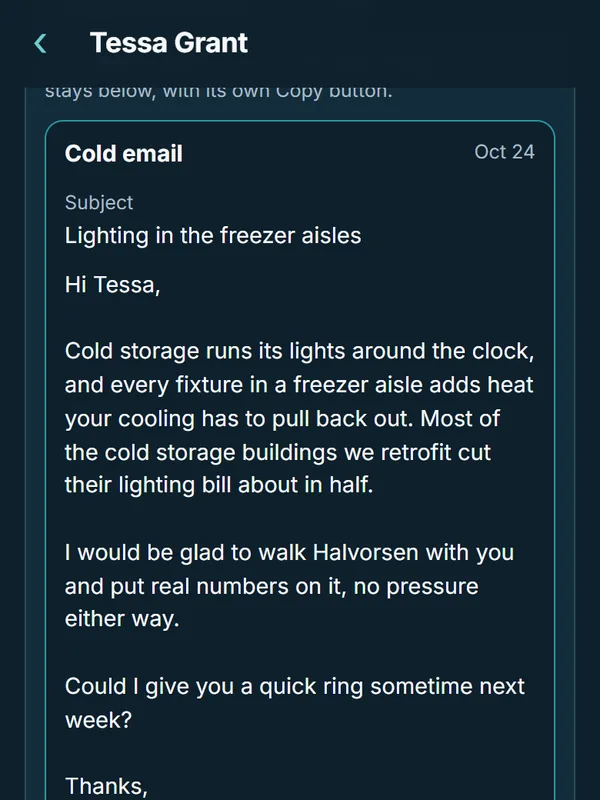 Written in your voice
 Tessa Grant
Optimized driving routes
- See every lead on the map
- Optimized driving routes, created automatically
- Save time and resources
- Less time driving, more time in front of clients
Today's route, 4 stopsSample map
Ready for your manager
- Your sales activity presented as a clear, readable chart
- Sent by email in one click
- Calls45
- Emails24
- One pagers sent9
- Meetings8
- Drop ins6
- Weekly touchpoints92
Your technical sidekick in the field
- S2S supports you even out in the field
- jobwalkai.app makes sense of the technical parts of your job
- The technical discovery assistant built into Save to Sell
- Technical specifications, job scope and clear language for your client deliverables

Tell it what you know about the job. It helps you work out:
- What to ask
- What might be involved
- How to present it to your team
S2S connects with Claude and ChatGPT
The S2S connector lets you, straight from your AI tool:
- Update your tracker
- Give it commands and new prompts
- Add new information
Today
Who's due and who's hot
1. Today2. Open the lead3. Call script, written for you4. Call5. Voice update6. The tracker updates itself7. Calendar8. Optimized drive route
Leads on the Free plan
Start with every Pro feature free for 30 days
Then keep Free, or go Pro for $19.99 a month
Built by working B2B sales reps for B2B sales reps.
Your free plan includes:





 You?
& More
What Founding Reps Say
Ten working reps got 90 days of Pro free in exchange for honest feedback. Here's some of what they told us.
Start free, upgrade when it pays off
- Every Pro feature free for 30 days
- Then pick Free or Pro, and every lead stays
- Your plan and this month's use always on screen, so the limits never surprise you
- 30 screenshots a month
- 250 leads in your Sales Tracker
- 50 drafts a month in your voice
- Company research and Call script notes once every 7 days
or $199 a year, save $40
Early rep price lock. Go Pro by December 31, 2026 and keep your price for as long as you stay subscribed.
Start free, upgrade in the app Everything in Free, plus- 300 screenshots a month
- 1,000 leads in your Sales Tracker
- 500 drafts a month in your voice
- Company research and Call script notes on every lead
- Emails keep going all month, up to 25 a day after your allowance
- Credits for extra research, call scripts and imports when you need them
- More jobwalkai.app runs every month
- S2S SWEEP: Deep web research done for you on companies with a public reason to buy now, with a likely contact, all set up and ready for you to press send Coming soon
Own one of Nate Brannock's books? Pro is $9.99 a month for 12 months, with a smaller monthly AI allowance. Cancel any time. See Nate's books on Amazon, then get your book owner code by answering one question from the book.
How S2S Stacks Up
Save to Sell next to the two CRMs reps get handed most, feature by feature.
| For the rep | Save to SellPro $19.99 a month | HubSpotSales Hub | Zoho CRMCRM editions |
|---|---|---|---|
| Snap a business card into a lead | One card, or a spread of cards in one photo | Free card scanner app | In the mobile app |
| A LinkedIn profile becomes a lead | From a screenshot, no Sales Navigator needed | Paid plan Professional, $90, plus Sales Navigator | Paid plan Enterprise, $40, plus Sales Navigator |
| AI writes your emails | Plus call scripts, LinkedIn notes and letters, in your voice. Free has 50 a month | AI email writer, free | Paid plan Zia on Professional, $23 |
| A 7 touch follow up plan on every lead | On every plan, Free included | Paid plan Sequences on Professional, $90 | Paid plan Cadences on Standard, $14 |
| Company research before you call | Free once a week, Pro on every lead | Paid plan Prospecting agent on Starter, $20, uses credits | Paid plan Data enrichment on Standard, $14 |
| A lead map and an optimized drive route | On every plan, opens in Google Maps, Apple Maps or Waze | Add on RouteIQ, from $9 a user | |
| Works with no signal on your phone | Notes, statuses and voice notes sync when signal is back | Offline mode in the mobile app | |
| A weekly report for your manager | Sales Activity Report, sent in one click | Reports and dashboards, free | Standard reports, free |
| Client proposals | A one page proposal with a price table, on every plan | Paid plan Revenue Hub Professional, $85 | Paid plan Quotes on Professional, $23 |
| A most likely to buy score | On every plan, with the reasons on each lead | Paid plan Lead scoring on Professional, $90 | Paid plan Scoring rules on Standard, $14 |
| Free plan | 250 leads for one rep | 2 users, 1,000 contacts | 3 users, 5,000 records |
| Price for one rep, a month | $19.99 for Pro, or $199 a year | Starter $20, Professional $90 | Standard $14, or $20 month to month |
| Setup | Under 5 minutes, no admin needed | Professional adds a required $1,500 onboarding fee | Free onboarding |
Also in Save to Sell
- Update your tracker by voice
- jobwalkai.app, the job walk assistant for technical scope and specifications
- A Today screen with what's due and your hot leads
- Client summaries and marketing one pagers, written for you
- Claude connector on every plan, ChatGPT coming soon
- English, Spanish and French
HubSpot and Zoho prices are list prices per seat a month, billed yearly, from their own pricing pages. See the full comparison
- Your emails keep going all month, up to 25 a day once the allowance is used
- Credits keep research, call scripts and imports going: $5, $10, $15, or any amount from $20, good for 12 months
Want your company to pay for Pro? Expense your sales tracker with a ready note for your manager.
How does $19.99 compare? HubSpot's email sequences start on Professional at $90 a seat a month, billed yearly, plus a required $1,500 onboarding fee. See Save to Sell, HubSpot and Zoho CRM side by side.
Selling as a team?
One bill for the whole team. Pick by how many reps you have.
See team plans
Selling as a team?
One bill for the whole team. Pick by how many reps you have.
- One bill for the whole crew
- One monthly AI budget shared by the team
- Each rep keeps their own leads
- Add or remove reps any time
- Screenshots and leads shared across the company, 300 and 1,000 a rep
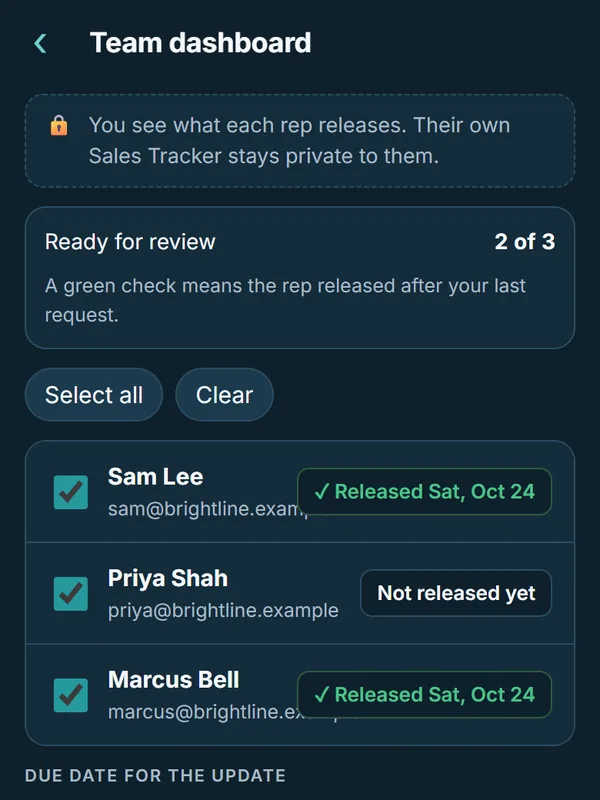
- Team dashboard: reps release their Sales Tracker for your review
- Request updates and print a Sales Tracker meeting summary
- The company keeps the leads reps add on the team
- Direct support, answered within 1 business day
- AI and lead limits set for your team
- Onboarding for your managers and reps
- Priority support
- A yearly contract and invoicing
- First access to new lead generation tools
Or email support@savetosell.app
Let us help you decide
Do I need an AI account?
No. Everything runs inside Save to Sell. There's nothing else to sign up for or pay for.
What devices does it work on?
Any of them. Use it in the browser on your Windows PC or Mac, or on your iPhone or Android phone, and your leads stay in sync. On a computer, add it to your Dock or taskbar so it opens like any other app. The Android app is on Google Play, and the iPhone app is coming soon.
What if I screenshot something unrelated?
It's flagged NOT SALES and deletes itself 30 days after you save it, unless you keep it. It never lands in your Sales Tracker.
Is it safe to bring in my client list?
Yes. When you upload an Excel or CSV list, Save to Sell keeps only the contact columns it needs: name, title, company, email, phone, address, website and LinkedIn. Every other column, like deal sizes, pricing or internal notes, is dropped on your own phone or computer before anything is saved, and no AI reads the file. We never sell your leads, and we never use them to train AI.
Can I delete my data?
Yes. Settings has a Delete my account button that erases your screenshots, leads, drafts and profile for good. Here's how.
Your Leads. Your Notes. Your Next Move. One Sales Tracker.
Your Time Belongs With Clients. Get More of It Back. Save Time, Go Sell.

iPhone app: Coming Soon, November 2026
Works on your Windows PC, Mac, iPhone and Android phone. One account, always in sync.